
Descarcă ThisIsMyFile – Deblocator și Manager de Fișiere Gratuit pentru PC cu Windows
Obosit de blocarea fișierelor și folderelor pe PC-ul tău cu Windows? ThisIsMyFile este un instrument utilitar ușor, sigur și gratuit, conceput pentru a te ajuta să deblochezi sau să ștergi fișierele încăpățânate cu ușurință. Dezvoltat de SoftwareOK, acest software portabil de gestionare a fișierelor suportă toate tipurile de fișiere și folosește multiple metode de deblocare pentru a maximiza ratele de succes.
Indiferent dacă un fișier este blocat de un proces în execuție, de protecția sistemului sau de o eroare necunoscută, ThisIsMyFile oferă o soluție fiabilă fără a necesita instalare sau dependențe terțe. Ideal atât pentru utilizatorii ocazionali, cât și pentru profesioniștii IT, acest instrument simplifică gestionarea securității fișierelor cu o interfață curată și intuitivă. Descarcă ThisIsMyFile astăzi și recâștigă controlul complet asupra fișierelor sistemului tău—fără mai multe erori frustrante de „acces refuzat”.
De ce ThisIsMyFile se evidențiază printre instrumentele de deblocare a fișierelor
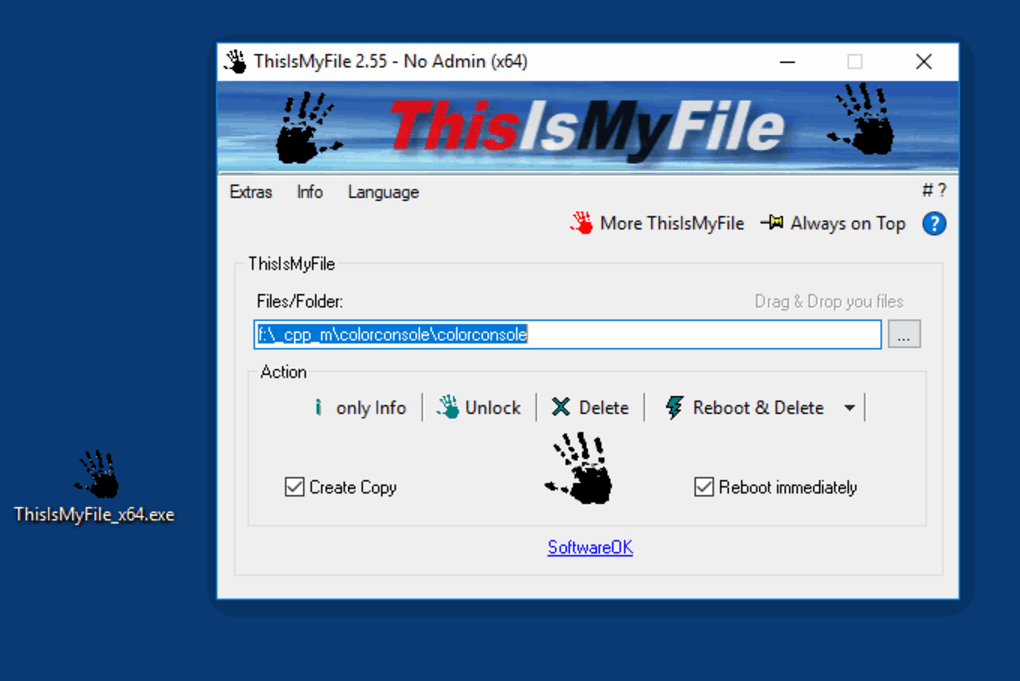
When dealing with locked files, many users turn to third-party tools like Unlocker or IObit Unlocker. While these tools are effective, they often come with bundled software, ads, or require installation. ThisIsMyFile eliminates these drawbacks by offering a truly portable, ad-free, and secure experience. Unlike traditional file managers, it doesn’t modify system settings or register entries in the Windows Registry. Instead, it works directly at the file system level using advanced techniques such as handle release, process termination, and delayed deletion. The tool analyzes the root cause of the lock—whether it’s due to a background process, antivirus interference, or file corruption—and provides actionable insights. One of the most impressive aspects of ThisIsMyFile is its simplicity. The interface is minimal yet powerful, allowing users to drag and drop any file or folder directly into the application window. There’s no need to navigate complex menus or memorize commands. Once a file is added, users can choose from four distinct actions: Only Info (diagnose the lock), Unlock, Delete, or Reboot & Delete (with or without confirmation). The Reboot & Delete option is particularly useful for system files or those locked during startup, as it schedules the deletion for the next boot cycle. This feature ensures that even deeply embedded locks are broken without manual intervention. Additionally, ThisIsMyFile includes two smart checkboxes: one to create a backup copy before deletion (ideal for accidental deletions), and another to automatically reboot the system when using the reboot-based options. This automation saves time and reduces user error. With its lightweight footprint and zero installation requirements, ThisIsMyFile is perfect for emergency troubleshooting, system maintenance, or quick file recovery tasks.Cum să folosești ThisIsMyFile: Ghid pas cu pas
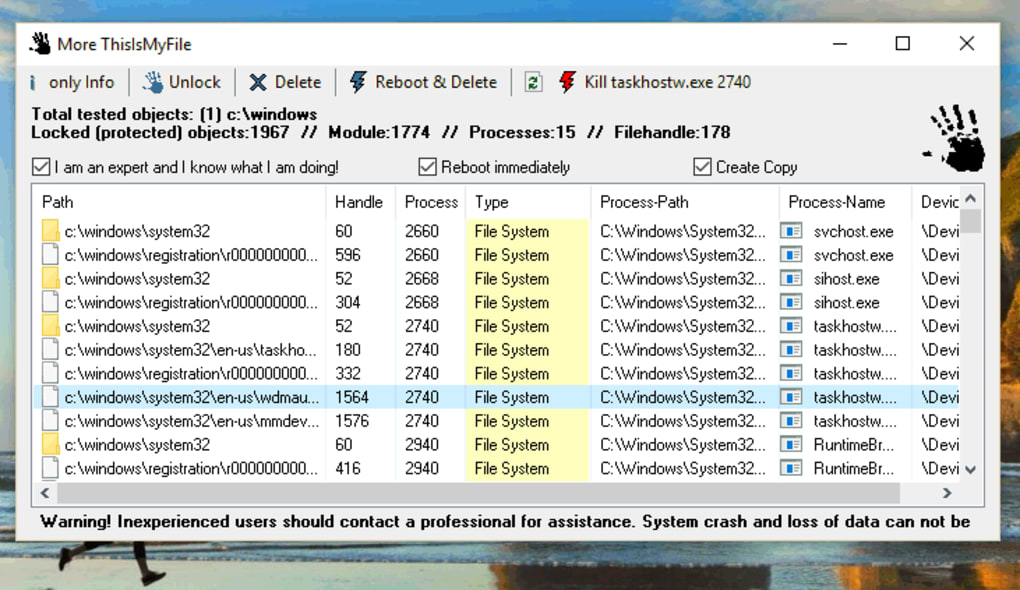
Using ThisIsMyFile is straightforward, even for users with minimal technical knowledge. Here’s a complete guide to help you unlock or delete any locked file on your Windows PC: 1. Download and Extract: Visit the official SoftwareOK website and download the latest version of ThisIsMyFile. Since it’s a portable app, simply extract the ZIP file to a folder of your choice—no installation needed. 2. Add Files or Folders: Launch the application. You can either drag and drop the locked file or folder directly into the program window, or click the “Browse” button to locate it manually. The tool instantly recognizes the file and displays its path. 3. Analyze the Lock (Optional): Select the Only Info option to see detailed information about why the file is locked. This includes the process ID, process name, and file handle status. This diagnostic step helps you determine whether the file is safe to unlock or delete. 4. Choose Your Action: Based on the analysis, select one of the following: - Unlock: Frees the file so you can access or modify it immediately. - Delete: Removes the file right away (use with caution). - Reboot & Delete: Schedules the file for deletion at the next system restart. - Reboot & Delete without Query: Same as above, but skips confirmation prompts. 5. Enable Safety Features: Check the boxes for Create Copy Before Delete and Reboot Immediately if you want added protection and automation. 6. Execute and Confirm: Click the chosen action. If a reboot is required, the system will restart automatically after the specified delay. This process typically takes less than 30 seconds and works across all versions of Windows, including Windows 10 and Windows 11. The tool is especially useful when dealing with corrupted software installations, leftover files after uninstalls, or system updates that leave files locked.Compatibilitate, securitate și cerințe de sistem
ThisIsMyFile is designed specifically for Windows PCs and is fully compatible with all modern Windows operating systems, including Windows 7, 8, 10, and 11 (both 32-bit and 64-bit versions). As a portable application, it doesn’t require administrative privileges to run, though some actions—like deleting system files—may prompt UAC (User Account Control) prompts. ThisIsMyFile does not install any drivers, services, or background processes, ensuring minimal impact on system performance and security. The software is completely free to download and use, with no trial periods, ads, or hidden fees. It’s also safe to use, as it doesn’t collect user data or connect to external servers. The source code is open for review, and the developer maintains a strong reputation for delivering clean, reliable tools. For users concerned about malware, you can verify the file signature using tools like VirusTotal before running it. In terms of system requirements, ThisIsMyFile is extremely lightweight. It runs on machines with as little as 1 GB of RAM and 100 MB of free disk space. The executable file is under 1 MB, making it ideal for USB drives, recovery environments, or emergency troubleshooting kits. While it currently has no official versions for Mac, iOS, or Android, its Windows-only focus ensures deep integration and optimal performance on PC platforms.Pro și Contra: Este ThisIsMyFile potrivit pentru tine?
- Pro:
- Software gratuit și fără reclame, fără instalare necesară
- Suportă toate tipurile și dimensiunile de fișiere
- Multiple metode de deblocare cresc rata de succes
- Portabil și sigur de rulat de pe unități USB
- Include informații de diagnostic și opțiuni de ștergere sigură
- Funcționalitate automată de repornire pentru fișiere încăpățânate
- Impact minim asupra sistemului și execuție rapidă
- Contra:
- Disponibil doar pentru Windows (fără versiuni pentru Mac sau mobil)
- Nu garantează 100% deblocarea fiecărui fișier
- Limitat la operații la nivel de sistem de fișiere (fără sincronizare în cloud)
- Lipsă funcție integrată de recuperare sau restaurare a fișierelor
Întrebări frecvente (FAQ)
How do I download ThisIsMyFile?
Go to the official SoftwareOK website, locate the download section, and click the link to download the latest portable version. Save the ZIP file to your computer, extract it, and run the executable directly.
Is ThisIsMyFile safe to use?
Yes, ThisIsMyFile is completely safe. It’s a lightweight, portable tool that doesn’t install anything, collect data, or require admin rights. Always download from the official site to avoid tampered versions.
Can I use ThisIsMyFile on Windows 11?
Absolutely. ThisIsMyFile is fully compatible with Windows 11 and works seamlessly on all supported Windows versions.
What should I do if ThisIsMyFile can’t unlock a file?
Try using the “Only Info” option first to identify the locking process. If the file is locked by a critical system process, it may be unsafe to unlock. In such cases, consider using the “Reboot & Delete” option or consulting system logs.
Does ThisIsMyFile work on Mac or mobile devices?
No, ThisIsMyFile is currently only available for Windows PCs. There are no official versions for Mac, iOS, or Android.
Can I create a backup before deleting a file?
Yes, simply check the “Create Copy Before Delete” box before performing a deletion. This ensures you have a safe copy in case of accidental removal.







